

Highlight suggestions are available for question frameworks where we’ve completed evaluations and achieved above-human performance. Currently, these include PICOS, PECO and PCC, with more to come.
Overview
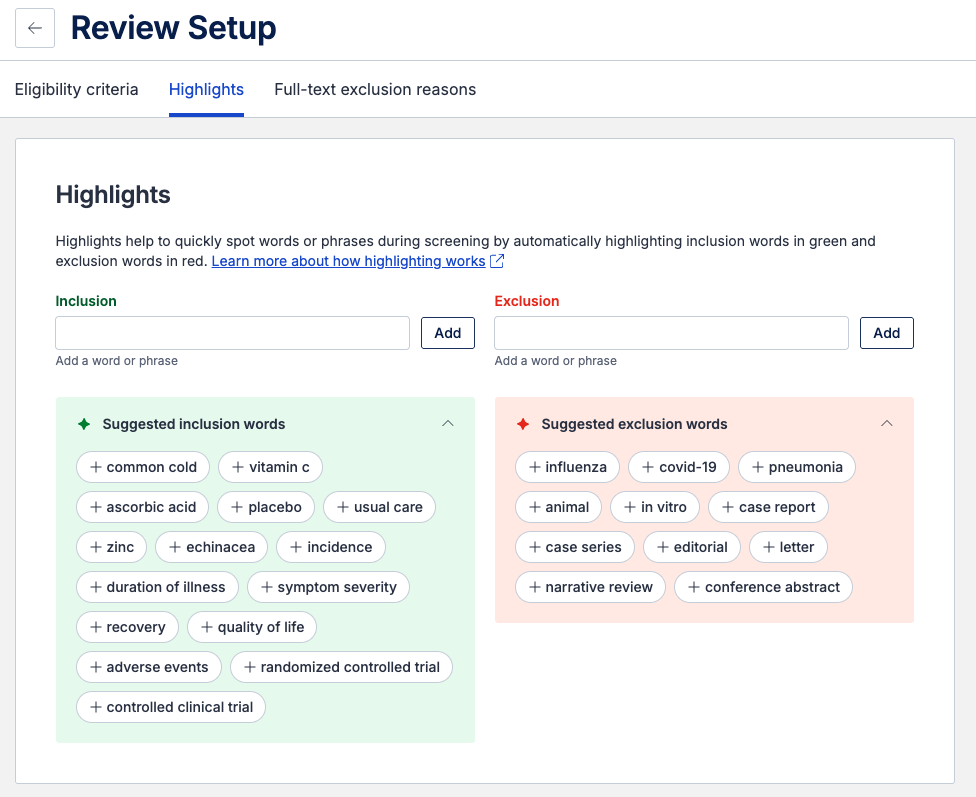
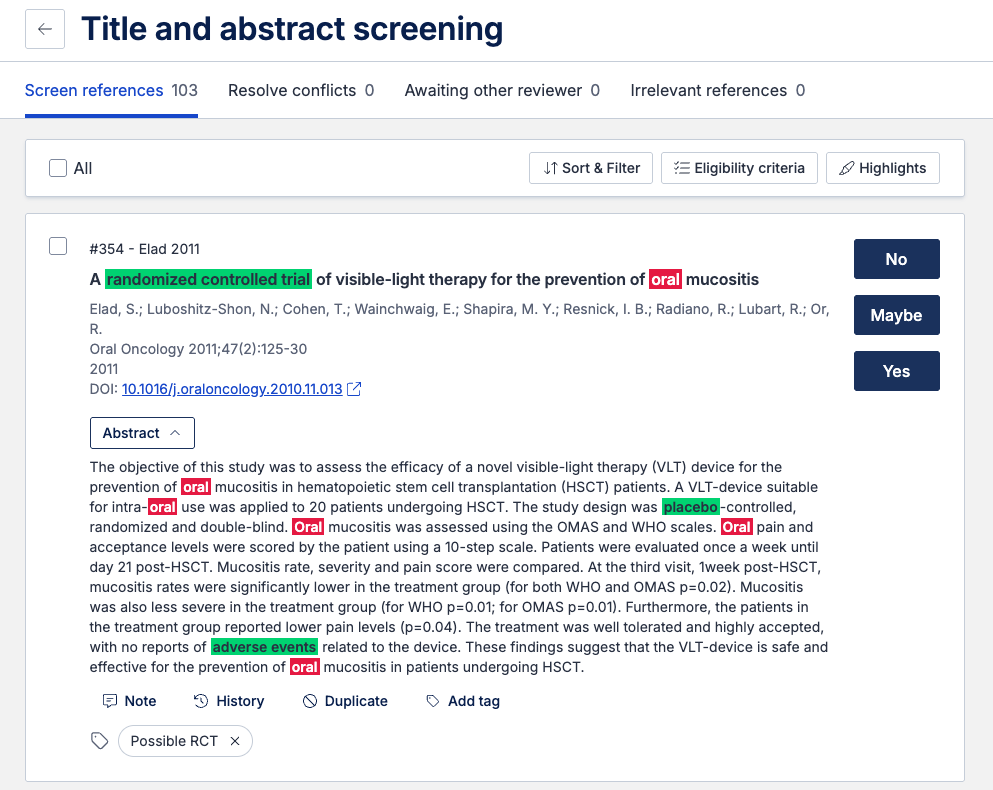
Covidence uses a large language model (LLM) to suggest inclusion and exclusion highlight terms (keywords and phrases) based on your review's eligibility criteria. Inclusion terms appear in green and exclusion terms in red during ‘Title and abstract’ screening, helping your team spot relevant details faster.
Suggestions are generated from the eligibility criteria you've added to your review. Reviewers must review each suggested term and choose whether to add it to the inclusion or exclusion highlights list. No term is added without your approval, and highlights never make screening decisions: your team decides on every study.
You can still add or remove highlights yourself at any time, including terms the model didn't suggest.
Using suggested inclusion highlights
To use the highlight suggestions feature it must be enabled within review settings.
Add your eligibility criteria. Suggestions are based on the eligibility criteria you've entered. The more complete and specific your criteria, the better the suggestions.
Go to the highlights page in Review Setup. If your review has eligibility criteria, you'll see the Suggest for me option for inclusion and exclusion highlights.
Select Suggest highlights. Covidence generates a list of suggested terms. This may take a few seconds.
Review each suggestion. Add the terms that suit your review. Suggestions you don't add are not saved as highlights. Terms already in your inclusion list aren't suggested again.
Screen as usual. The terms you added appear in green or red in titles and abstracts during Title and abstract screening.
If no new terms can be suggested, you'll see a message saying no further suggestions were found. If your criteria doesn't contain enough detail to suggest terms, you'll see a message asking you to add more detail to your eligibility criteria.
What happens if I don't use it?
Nothing changes. Using the inclusion and exclusion highlight suggestions is optional. They only appear when you choose to generate them, and you can keep adding highlights manually as before.
Can I disable it?
You can disable the feature at any time. If you disable highlight suggestions in review settings, you’ll no longer see suggested highlights. Any suggestions you’ve already added to your inclusion or exclusion highlight lists will remain, but you can remove them manually.
Why didn't the model suggest a term I expected?
Suggestions are based only on your eligibility criteria, so the model won't suggest a term that isn't in them. For example, if your criteria only describes study designs, it won't suggest your review's topic or condition.
Should I add single words or phrases?
Both work well, but they’re matched differently. When you add a single word, Covidence uses stemming to also highlight words that start the same way. For example, adding “child” will also highlight “children” and “childhood”.
Phrases, acronyms and hyphenated terms are matched exactly as written. This makes them more precise, but they may appear in fewer titles and abstracts.
For specific phrases like “music therapy”, you may want to add the core word too, such as “music”, to catch both the phrase and related mentions. You can read more in How highlighting works in Covidence.
Model information
This model automatically suggests inclusion and exclusion highlights using a large language model (LLM).
Covidence uses Google's Gemini models through Vertex AI. Your review's eligibility criteria text is sent to the model to generate suggestions. Google does not use customer data to train or fine-tune models under its terms and conditions for Google Cloud Services.
We evaluated the model output against a benchmark dataset of 148 English-language reviews across the PICOS, PCC and PECOS frameworks. The model achieved a precision of 98.2% [97.1% - 99.1%] for inclusion highlights and 95.7% [93.8% - 97.2%] for exclusion highlights, outperforming typical human performance for screening. We compared the model with human screening because highlights are there to help reviewers make screening decisions more easily.
For more detail on model design, evaluation and performance, see the full technical documentation.
Known limitations to be aware of:
Eligibility criteria are needed. Suggestions are only available for reviews with eligibility criteria added in Covidence.
Suggestions reflect your criteria. The model doesn't see your review title, protocol or studies. Sparse criteria produce fewer suggestions, and topic terms not mentioned in your criteria won't be suggested.
Performance was tested on English-language criteria. Performance may differ for criteria written in other languages.
Some suggestions may be too generic or ambiguous. In testing, a small number of suggestions were common research words (such as "knowledge") or ambiguous abbreviations (such as "HF"). Review each term before adding it.
Some phrases may not appear in abstracts. Phrases only match exactly, so a suggested phrase may highlight few or no studies. Adding the core single word can help.
Reporting feature usage
Adapt the text below to your review. It’s based on the Cochrane Reporting Template in the Position Statement (2025), which helps you report AI use with appropriate methodological rigor, integrity and human oversight.
For your protocol
Use this when registering your review (e.g. PROSPERO) to declare your intent.
"We will use the "Highlight suggestions" feature developed by Covidence to suggest inclusion and exclusion highlight terms based on our eligibility criteria. Suggested terms will be reviewed before being added as inclusion or exclusion highlights for title and abstract screening.
The tool will be used as described in the Covidence user guide, with no customisation, training or changes to parameters
Outputs from the tool are justified for use in our synthesis because they have been evaluated in our specific context:
Human oversight: Reviewers decide which suggested terms to add, and all screening decisions remain with human reviewers.Performance evaluation: Suggestions were evaluated against relevant datasets and performed better than typical human screening rates.
To ensure it does not undermine the trustworthiness of the synthesis."
For your Manuscript (Methods Section)
Use this in your final paper to describe what actually happened.
"We used the "Highlight suggestions" feature (no version number available; accessed [date]), developed by Covidence, to suggest inclusion and exclusion highlight terms from our eligibility criteria for title and abstract screening. We used it as described in the Covidence user guide, with no customisation, training or changes to parameters.
Outputs are justified for use in our synthesis because:
Human decision on every suggestion: Reviewers decide whether to add each term, and they make all screening decisions. Highlights are only a visual aid and do not include or exclude studies.Better than typical human screening performance: In evaluation, inclusion highlight precision was 98.2% (97.1–99.1%) and exclusion highlight precision was 95.7% (93.8–97.2%).
Limitations include:
Suggestions come only from the eligibility criteria entered, so relevant terms that aren't in the criteria may be missed.The tool was evaluated on a curated sample of English-language reviews only. Performance may be lower for unusual review types or questions, or for papers in other languages.Reviewers check every suggestion, but incorrect inclusion highlights could still influence screening judgements.
A detailed description of the methodology, including parameters and validation procedures, is available in the Covidence support documentation and related supplementary materials"