


Covidence
To use Covidence, request an account here.
What is Covidence
Covidence is a web-based tool that will help you through the process of screening your references, data extraction, and keeping track of your work. It is particularly useful for researchers conducting a systematic review, meta-analysis or clinical guideline.
How to request access to UTEP's Covidence institutional license
To request access to the institutional account in Covidence:
Complete our request form.
Wait for an invitation email from Covidence.
Accept the invitation in your email – check your spam folder if the invitation doesn’t arrive in 1-2 business days. Please also keep in mind that the link is one-time use and will expire in ~30 days.
Log in to your existing Covidence account or sign up for a new account, which will automatically link you to UTEP's subscription.
Creating a review using the UTEP unlimited license
After clicking the link “Create new review” you will have the option to use your personal account license or select the UTEP account:
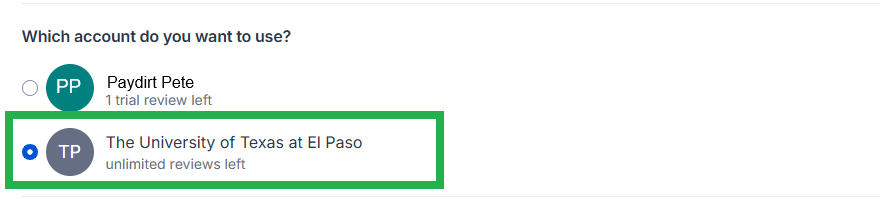
Reviews created under the institutional license will be visible to the administrators of the UTEP Covidence account. Your personal account review(s) will only be seen by you.
NOTE: Reviews with no activity in 6 months will be deleted.
If you have any questions about UTEP's subscription to Covidence, please contact us by email at ask@utep.libanswers.com OR use our contact form here.
Help with Covidence
View the Covidence Knowledge Base or YouTube Channel.
When logged in, click the question mark next to your name to contact the Covidence support team.