


Welcome!
Universitätsklinikum Freiburg (Medical Center - University of Freiburg) can offer its current staff and researchers access to its licence to Covidence.
What is Covidence?
Covidence is a web-based software platform that streamlines the production of systematic reviews. It supports citation screening, full-text review, risk of bias assessment, extraction of study characteristics and outcomes, and the export of data and references.
Discover more about Covidence on each link:
Import references - Covidence works seamlessly with reference management software such as EndNote (Desktop or Online), or any tool that supports RIS or other file formats. Covidence can automatically remove duplicates for you.
Screen title & abstract - Breeze through screening with keyword highlighting & a lightning-quick interface. Covidence keeps full records of who voted and supports single or dual screeners.
Bulk PDF import - Transfer PDFs stored in your reference manager to Covidence in a few clicks.
Screen full text - Decide quickly on studies in full text. Capture reasons for exclusion and any notes so you can resolve any disagreements quickly, with a click of a button.
Create forms - Be in control and stay focused on your PICO question. Customisable extraction forms mean you only spend time extracting what you need.
Customise risk of bias - Automatically populate your risk of bias tables by highlighting and commenting on the text directly in your PDF.
Conduct data extraction - Extract data efficiently with a side-by-side view of your customised form and PDF. Then, when you are done, easily compare your form with other reviewers.
Export - Covidence exports to all the common formats so you can continue your review in your preferred software.
Collaborate - You can invite other reviewers (including external colleagues) to work with you on the project.
Why join the Medical Center - University of Freiburg access to Covidence?
Unlimited records for each review
Unlimited number of reviewers for each review (irrespective of their affiliation)
How to join 'Medical Center - University of Freiburg' Covidence licence
You can create your personal sign in information with Covidence before or after joining the institutional subscription.
Send an email request to Sabina Wallerer - sabina.wallerer@uniklinik-freiburg.de
An invitation will be generated and sent from Covidence
Accept the invitation in your email – check your spam folder if the invitation doesn’t arrive in a few minutes. Please also keep in mind that the link is one-time use and will expire in ~30 days
Log in to your existing Covidence account or sign up for a new account, which will automatically link you to Medical Center - University of Freiburg
If you have already joined the institutional Covidence account, then you can log into Covidence with your email and password and proceed to use Covidence
Creating a review using the 'Medical Center - University of Freiburg' licence
When you “Start a new review”, make sure to select - "Universitätsklinikum Freiburg (Medical Center - University of Freiburg)"
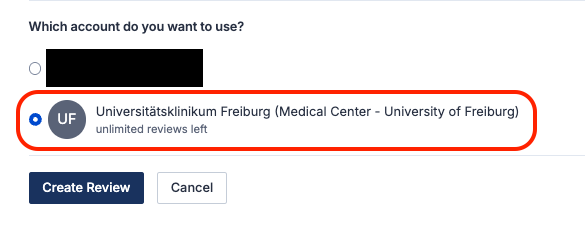
Reviews created under the institutional licence will have full functionality/features and be visible to the administrators of the 'Medical Center - University of Freiburg' Covidence account. Your personal account review(s) will only be seen by you.
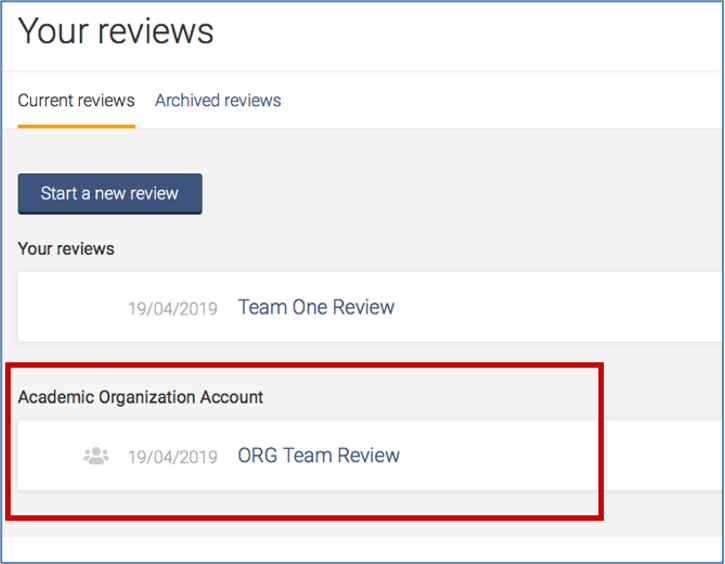
Once you have created a review or accepted an invitation to another 'Medical Center - University of Freiburg' account review, the title will appear in a separate section on your account homepage:
Working with review team members from other institutions?
Once a review is created, you are able to add co-reviewers.
From the homepage (Your reviews), select the review you wish to add co-reviewers to and click on “Settings”

From the review Settings, navigate to “Add/remove reviewers”
Click on “Invite another reviewer” and enter your reviewer’s first name and email addresses to invite them
Support from Covidence
Covidence offers a range of available resources and support to help you along the way with your systematic review process.
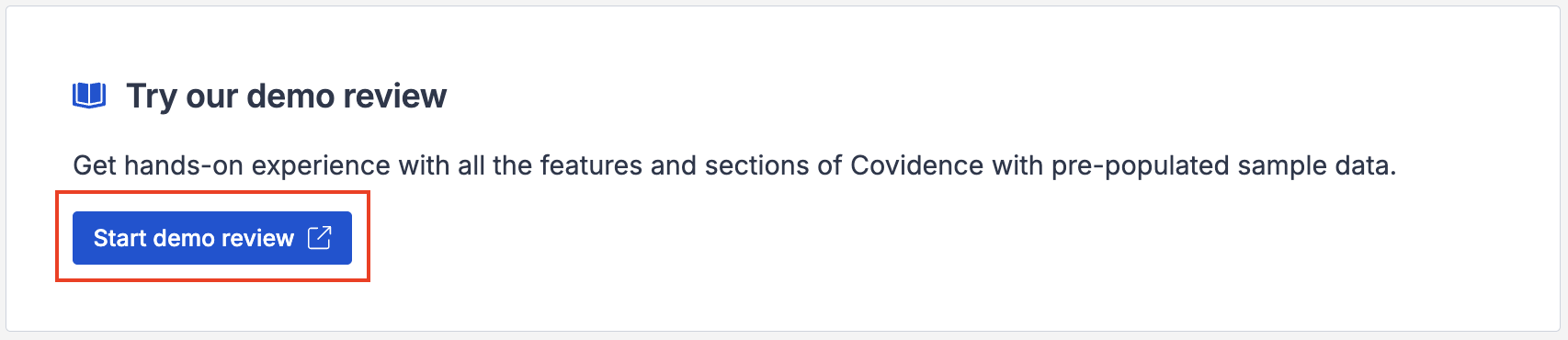
To get familiar with how a Covidence workflow works, you can try our pre-set Demo review. This will allow you to gain hands-on experience and better understand the process. You will find it at the bottom of your dashboard once you have signed in. Give it a go and feel free to explore!
Getting started with Covidence - video tutorials that guide you through the initial area to get you started.
Covidence Knowledge Base - home to all of our comprehensive articles, instructions and advice to FAQs.
Covidence Academy - Learn and understand the essentials of systematic reviews and gain insight with expert-led training and content to guide you through every step of the review process.
Covidence eBook Collection - Download our step-by-step practical guides for Systematic Review Success.
Monthly Open Training Webinars - Join our Community Team for free webinars (registration required) or watch our recent recordings without delay.
Online Support Team- contact our team directly for support on your review by emailing support@covidence.org
When logged into your account, you can also easily contact the Support Team via the chat icon in the lower right corner, and the comprehensive articles from our Knowledge Base from the '?' icon on the upper right corner of the window.
Maintaining Access to Your Work When Leaving the Organisation
You are required to add a secondary email address before leaving, as this will ensure uninterrupted access to your Covidence account.
If you need to log back into your Covidence account but cannot because you don’t have access to your university email address anymore, please get in touch by emailing support@covidence.org.